Quick Search



SamFirm AIO — also searched as SamFirm A.I.O, SamFirm_AIO, or simply "sam firm" — is a free Windows tool that downloads official Samsung firmware directly from Samsung's own servers. Instead of hunting for stock ROM files on random forums and file-hosting sites, you enter your device model and region code, and SamFirm pulls the exact firmware Samsung itself delivers for that device: the correct PDA build, CSC package, and binary version, untouched and unmodified.
This page gives you the latest SamFirm AIO v3.3 download, a complete version archive (including v3.0, v3.1, v1.6.4 and v1.4.3), a step-by-step usage guide, fixes for the errors users actually hit, and straight answers on safety. Everything here is free — SamFirm AIO has never required a paid activation, a dongle, or a reseller.
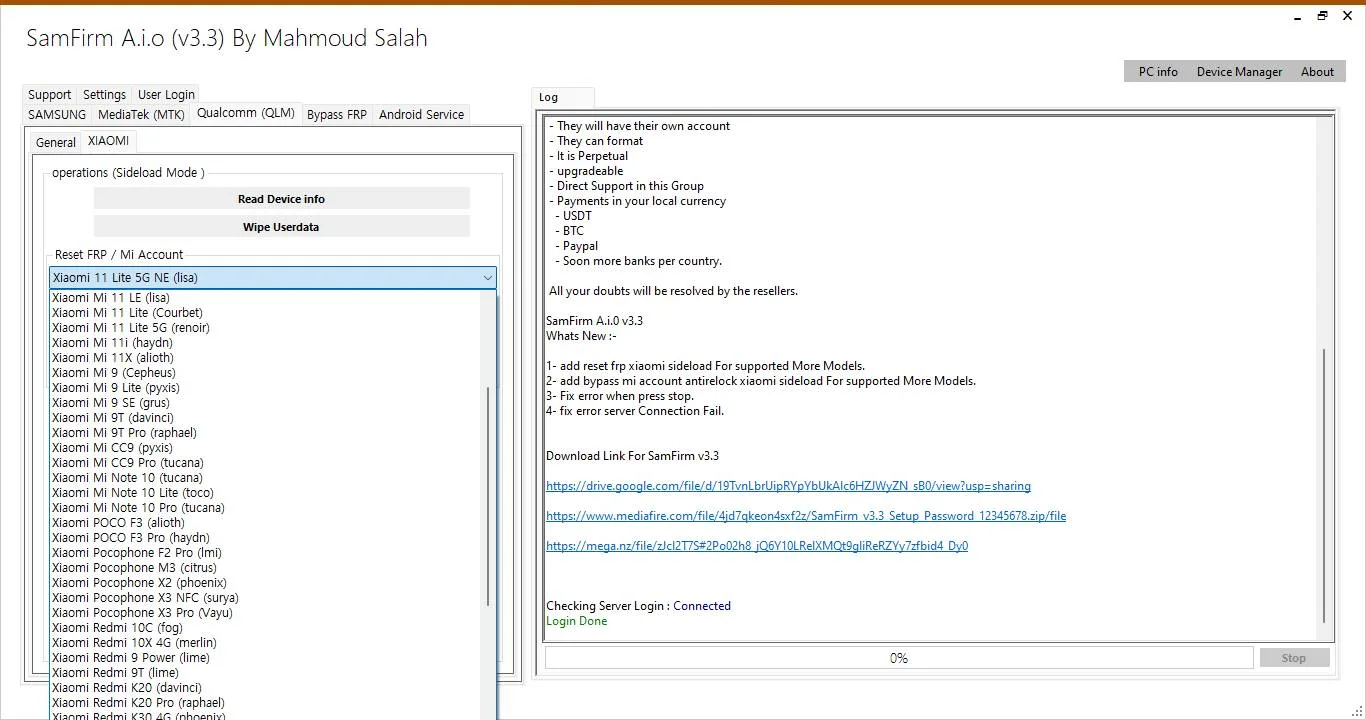
| Tool name | SamFirm AIO (SamFirm_A.I.O) |
| Latest version | v3.3 |
| Developer | Mahmoud Salah |
| License | Free |
| Operating system | Windows 8.1 / 10 / 11 |
| Purpose | Download official Samsung firmware (stock ROM) directly from Samsung's servers |
Download GDrive link · Download Icloudy link
What Is SamFirm AIO?
The original SamFirm tool, created by developer Mahmoud Salah, became the standard way for Samsung owners and repair technicians to download firmware straight from Samsung's update (FUS) servers. Samsung publishes firmware per model and per region, but it never offered consumers a simple official downloader — SamFirm filled that gap.
SamFirm AIO ("All-In-One") is the evolved version of that tool. It keeps the same core job — fast, direct, official firmware downloads — and packages it in a cleaner interface with automatic decryption, better region (CSC) handling, and additional device utilities that technicians asked for, including MTP-mode functions used in FRP workflows.
One thing SamFirm AIO does not do: it does not flash firmware to your phone. It downloads the firmware package to your PC. Flashing is a separate step done with a flashing tool such as Odin — see our Odin download and guide page for that part of the process.
Because the tool is searched for under many spellings — samfirm aio, samfirm a.i.o, samfirm_aio_v3.3, samfirm aio tool v3.3, samfirm 3.3 — this page covers all of them. They all refer to the same tool and the same v3.3 build linked below.
Key Features of SamFirm AIO
- Direct from Samsung's servers — firmware comes from Samsung's official update infrastructure, so files are 100% official and unmodified.
- Exact match by model + CSC — enter your model number (e.g. SM-S928B) and region code (CSC) and get the precise build released for that combination.
- Automatic decryption — downloaded firmware is decrypted by the tool automatically; there is no separate decrypt step.
- Download resume — if your connection drops mid-download, SamFirm can resume instead of restarting a multi-GB file from zero.
- Integrity checking — the tool verifies downloads (CRC/MD5) so you know the package arrived complete and uncorrupted before you flash it.
- Auto and Manual modes — let the tool detect the latest build automatically, or specify exact version components yourself.
- Fast downloads — pulls at the full speed Samsung's servers allow, with no throttling, no timers, and no premium tier.
- All Galaxy devices — works for Samsung Galaxy phones and tablets, old and new, across virtually all regions.
- MTP utilities built in — the AIO line includes MTP-mode device functions widely used by technicians, including shortcuts used in FRP workflows.
- Portable and free — no installation required, no Samsung account, no activation, no cost.
What's New in SamFirm AIO v3.3
The current v3.3 build (samfirm aio tool v3.3 / samfirm_a.i.o_v3.3) focuses on reliability:
- Fixed connection-drop errors that interrupted Samsung server checks
- Fixed a crash that occurred when pressing "Stop" during a download
- Improved regional CSC detection across more models
- General stability improvements over v3.0 and v3.1
If you arrived here searching for "samfirm 3.3 download" or "samfirm aio v3.3 descargar", this v3.3 build is the one you want. The older builds in the archive below are kept for troubleshooting and low-spec PCs, but v3.3 is the recommended download.
Download SamFirm AIO v3.3
| Version | v3.3 (latest) |
| File name | SamFirm_A.I.O_v3.3.zip |
| Developer | Mahmoud Salah |
| License | Free |
| OS | Windows 8.1, 10, 11 |
| Category | Samsung firmware downloader / mobile tools |
Download GDrive link · Download Icloudy link
SamFirm Version History — All Versions
Many users land on this page looking for one specific older build, not the newest one. Here is the full archive in one place:
| Version | Highlights | Status |
|---|---|---|
| v3.3 | Connection-drop and Stop-crash fixes, improved CSC detection | Latest — recommended |
| v3.1 | Stability update for the 3.x line | Archived |
| v3.0 | First 3.x AIO build ("samfirm 3.0") — the version many guides still reference | Archived |
| v1.6.4 | AIO technician line with MTK one-click support (Read Info, FRP, Format) and wide brand coverage | Archived |
| v1.4.3 | Lightweight classic AIO build, still widely mirrored and preferred on low-spec PCs | Archived |
| SamFirm Reborn | Community-maintained fork you may see referenced on forums | External project |
If the latest version fails to detect your device properly, trying the previous major version is a sensible troubleshooting step before assuming the device is at fault.
System Requirements
- Operating system: Windows 8.1, 10, or 11 (Windows 7 is not supported). There is no Mac, Linux, or Android (APK) version of SamFirm AIO — any site offering one is not offering this tool.
- .NET Framework: required; the tool will prompt you if your Windows build is missing it.
- Samsung USB drivers: needed for the device-detection and MTP functions (not for plain firmware downloading).
- Disk space: a few hundred MB for the tool itself, plus several GB free for firmware packages, which commonly run 3–8 GB per model.
- Internet connection: stable broadband — firmware downloads are large.
- Permissions: run the tool as Administrator to avoid write/access errors.
How to Download and Install SamFirm AIO
SamFirm AIO is portable — there is no installer. Setup takes under a minute:
- Download the v3.3 ZIP from the download section above.
- Extract the ZIP first with WinRAR or 7-Zip. Do not run SamFirm.exe from inside the archive — running from the ZIP is the single most common cause of "the tool won't open" problems.
- Open the extracted folder and right-click SamFirm.exe → Run as administrator.
- If Windows SmartScreen appears, click "More info" → "Run anyway". This prompt appears because the tool is a small independent release, not a Microsoft Store app (see the safety section below).
- If the tool asks for .NET Framework, install the version it requests, then launch it again.
That's it — no activation, no license key, no account.
How to Use SamFirm AIO to Download Samsung Firmware
- Launch the tool as administrator.
- Enter your model number in the Model field — for example SM-A256E. You can find it under Settings → About phone, on the box, or on the sticker under the battery cover of older devices. Our IMEI checker can also identify your exact model from the IMEI.
- Enter your CSC (region code) — for example EUX (Europe), XSA (Australia), XSG (UAE), or INS (India). The CSC decides which regional build you receive, so it must match your device's region. Not sure? Check the full CSC list on the model's firmware page in our firmware database.
- Click "Check Update." SamFirm queries Samsung's servers and displays the latest available firmware for that model + CSC: the PDA version, CSC version, file name, and total size.
- Choose your save folder, then click "Download." The tool downloads the package and decrypts it automatically when finished.
- Let the integrity check complete. When it passes, your firmware is ready in the output folder as a ZIP containing the AP, BL, CP, and CSC files used for flashing.
- Flash with Odin when you're ready — SamFirm's job ends at the download. Follow our step-by-step Odin flashing guide and always back up your data first.
Auto vs. Manual mode: Auto mode finds the newest official build for your model + CSC and is what 95% of users should use. Manual mode lets advanced users request a specific older build by entering its PDA/CSC/Phone version strings — useful when you deliberately need an older binary for repair work.
SamFirm AIO and FRP: What the MTP Functions Do
The "AIO" line of SamFirm is also well known in repair shops for its MTP-mode utilities. When a Samsung device is connected to the PC in MTP (file transfer) mode, these functions can trigger on-device actions — such as opening the browser, YouTube, or Galaxy Store on the phone — which are the standard first steps in legitimate FRP (Factory Reset Protection) recovery workflows for device owners locked out of their own phones.
Two honest caveats: FRP behavior changes with every Samsung security patch, so no tool can promise a result on the newest patches, and these functions exist to help owners and technicians regain access to devices they are authorized to service. For dedicated FRP workflows, current methods, and per-model guides, see our SamFirms FRP Tool page and FRP bypass guides.
SamFirm AIO vs SamFirm Classic vs Frija
| SamFirm AIO v3.3 | SamFirm (Classic) | Frija | |
|---|---|---|---|
| Developer | Mahmoud Salah | Mahmoud Salah | SlackingVeteran (community) |
| Core job | Firmware download + utilities | Firmware download | Firmware download |
| Auto-decrypt | Yes | Manual step | Yes |
| Extra utilities | MTP functions, technician extras | No | No |
| Interface | Modern AIO layout | Original simple layout | Modern, minimal |
| Best for | Most users; technicians | Purists, old guides | Users who only want downloads |
All three pull from the same Samsung servers, so the firmware itself is identical — the difference is workflow and extras.
Is SamFirm AIO Safe?
Yes — with one condition: where you download it from matters more than the tool itself.
- The firmware SamFirm delivers comes from Samsung's own servers and is verified by the tool's integrity check, so the firmware files are exactly what Samsung published.
- The tool itself is a small freeware utility by an independent developer. Because it is not code-signed like big commercial software, Windows SmartScreen and some antivirus engines flag it with generic warnings. This is common for phone-service tools that communicate with devices at a low level.
- The real-world risk in this niche is repacked copies: third-party sites that bundle adware or worse into the ZIP. Protect yourself by downloading from this page, avoiding any copy that asks for payment or "activation", and scanning the extracted folder with your antivirus before running it.
- To be clear: SamFirm AIO is free software. Anyone selling it, charging an activation fee, or asking you to send personal details to a "reseller" is not connected to the tool or to this site.
Troubleshooting Common SamFirm AIO Errors
"Connection failed" or Check Update times out
Usually Samsung's server throttling or rejecting the request, not your PC. Wait a few minutes and retry. If it persists, re-check the model number and CSC character by character — a CSC typo is the most common cause of a failed check.
Check Update returns nothing / "no firmware found"
That model + CSC combination has no published firmware, or the CSC belongs to a different model variant. Verify your exact model variant (the letter at the end matters: SM-A256E and SM-A256U are different devices) and try your region's correct CSC.
Download gets stuck partway through
Almost always an unstable connection or temporary rate-limiting. Pause, wait a minute, and resume — SamFirm supports resuming, so you don't lose the gigabytes already downloaded.
The tool won't open at all
Confirm three things: you extracted the ZIP fully (not running from inside it), you're on Windows 8.1/10/11 (not Windows 7), and .NET Framework is installed. Then try Run as administrator.
Antivirus or SmartScreen blocks the tool
Add the extracted folder as an exclusion in your antivirus, and use SmartScreen's "Run anyway" option. Only do this for a copy you downloaded from a trusted source like this page.
Downloaded firmware won't flash
The failure is happening in the flashing step, not in SamFirm. Re-verify that the downloaded CSC matches your exact model variant, then follow the Odin guide carefully — wrong-variant firmware is the usual culprit.
SamFirm AIO or Direct Download From SamFirms — Which Should You Use?
Both routes end at the same official Samsung firmware; the difference is convenience. Use SamFirm AIO when you know your model and CSC and want the newest build the moment Samsung publishes it, with automatic decryption and resume — it talks to Samsung's servers live, so nothing is faster for a fresh release. Use the SamFirms firmware database when you want to browse first: every model's page lists all regions and all builds, including older versions the tool's Auto mode won't offer, with file details visible before you commit to a download. Many technicians use both — SamFirm AIO for today's update, and our firmware archive when a job needs a specific older binary. Either way, the files are the same untouched Samsung packages, and our IMEI checker can confirm your exact model and region before you download anything.
Frequently Asked Questions
What is the latest version of SamFirm AIO?
The latest version is SamFirm AIO v3.3 by Mahmoud Salah. It fixes connection-drop errors and a crash when stopping a download mid-way, and improves CSC detection over v3.0 and v3.1. You can download v3.3 free from this page.
Is SamFirm AIO free?
Yes. SamFirm AIO is completely free — no activation, no license key, no dongle, and no premium version. If any website asks you to pay for it or contact a reseller, that site is not official.
Is SamFirm AIO safe to use?
The tool downloads firmware directly from Samsung's official servers and verifies each download, so the firmware is genuine and unmodified. Download the tool itself only from trusted sources like this page, since unofficial repacks circulating on file hosts can bundle unwanted software.
Does SamFirm AIO work on Windows 11?
Yes. SamFirm AIO v3.3 runs on Windows 8.1, 10, and 11. Windows 7 is not supported, and there is no official Mac, Linux, or Android version.
What is the difference between SamFirm AIO v3.3 and v3.0?
v3.3 is a stability release: it fixes connection drops during server checks, a crash when pressing Stop during downloads, and improves regional CSC detection. The core downloading function is the same, so v3.3 is recommended for everyone.
Can SamFirm AIO flash firmware to my phone?
No. SamFirm AIO only downloads the firmware package to your PC. Flashing is done separately with a tool such as Odin. Downloading and flashing are two different steps — this page covers the download; our Odin guide covers the flash.
Why does Check Update fail or find no firmware?
The usual causes are a typo in the model number or CSC, a model + CSC combination Samsung has not published firmware for, or temporary throttling by Samsung's servers. Double-check both fields and retry after a few minutes.
Does SamFirm AIO work for FRP bypass?
The AIO line includes MTP-mode functions that technicians use as part of FRP recovery workflows on devices they own or are authorized to service. Results depend on the device's security patch level. For dedicated FRP tools and step-by-step guides, see our FRP section.
SamFirm AIO v3.3 remains the fastest free way to get genuine Samsung firmware onto your PC: type a model, type a CSC, and the exact official package Samsung published is on your disk, verified and ready to flash. Bookmark this page — we update it whenever a new SamFirm version drops, and the version archive above always keeps the older builds one click away.
Related on SamFirms: Download Odin · Samsung Firmware Database · IMEI Checker · SAMPro Tool
Price and how to activate
Prices 30$
Activation is one-time no need to renew
To create a new account
Send your details to the reseller via WhatsApp: +447414682326
Email
PC HWID
Last updated: October 202